Closing the register at the end of the day is a critical routine for any retail or service business. It ensures that the payments recorded in your POS system match the actual cash and other payments received, helping you spot discrepancies quickly and maintain accurate financial records. In Geelus, the process is simple and intuitive, giving you clear insight into your daily transactions.
This guide covers not only the steps to close the register in Geelus but also essential best practices for managing your cash float, the starting cash in your drawer to keep your cash handling disciplined and your reconciliations accurate.
Why Closing the Register Matters
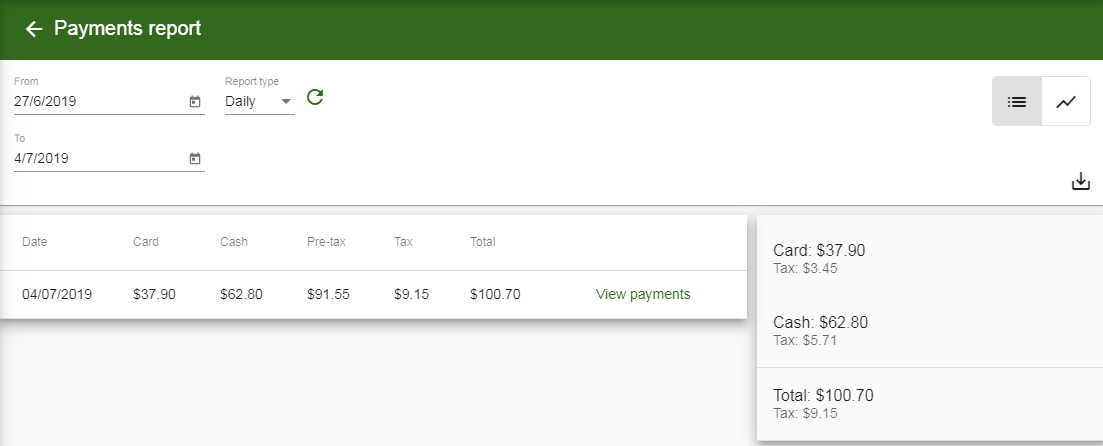
The primary goal is to compare recorded payments (transactions entered into Geelus, such as marking an order as paid in “Cash”) with actual payments (the physical money in the drawer, card terminal reports, etc.).
- If they match, your register is balanced.
- If there’s a difference, you’ll know right away whether money is missing or extra.
Consistent daily closures prevent small issues from becoming big problems and make monthly reporting much smoother.
Understanding Cash Float: The Foundation of Accurate Cash Management
A float (also called opening cash or starting cash) is the fixed amount of money you keep in the register at the start of each day to give change to customers. It is not income—it’s working capital that should remain constant from opening to closing.
Example
You open the day with $200 in the drawer. That $200 is your float.
What the Float Is Used For
- Providing change for cash-paying customers
- Handling small cash transactions efficiently
- Ensuring the register is ready for business at opening
Best Practices for Managing Your Float
- Set a fixed float amount
Choose a consistent amount and stick to it.- Small businesses: $100–$200
- Higher-volume cash businesses: $300–$500
- Start the day with the float
- Place the fixed amount in the drawer at opening.
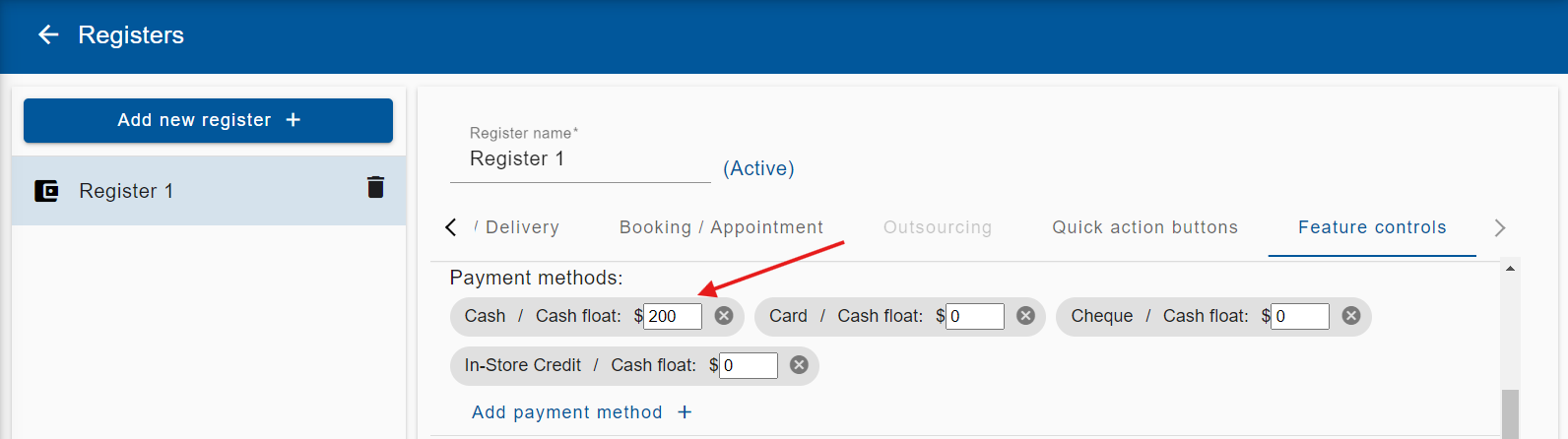
- Set it up in Geelus as the Opening Float (or Opening Cash). To enable the Cash Float feature (one-time setup only):Settings > Registers > Feature controls > Payment methods > Cash float
- During the day
- Cash sales will increase the drawer total.
- Never spend or remove the float portion without proper recording.
- Avoid:
- Using float for store purchases or petty cash
- Removing cash without documenting it
- Mixing float with daily takings
- If cash must be removed (e.g., for a bank deposit), record it as a cash payout transaction.
- End of day: Incorporate float into register closure
- Count all cash in the drawer.
- Subtract the float amount.
- The remainder is your actual cash takings for the day.
Example - Total cash in drawer: $950
- Float: $200
- Cash takings: $750
You then: - Remove the $750 in takings (deposit it or store securely)
- Leave the $200 float in the drawer for the next day
Why Float Discipline Matters
- Prevents unexplained cash shortages
- Ensures accurate reconciliation between recorded and actual payments
- Helps detect errors or theft early
- Keeps financial reports clean and auditable
Most cash discrepancies stem from improperly handling the float.
Common Mistakes to Avoid
❌ Changing the float amount without recording it
❌ Using float as petty cash
❌ Leaving excess cash in the drawer overnight
Step-by-Step: How to Close the Register in Geelus
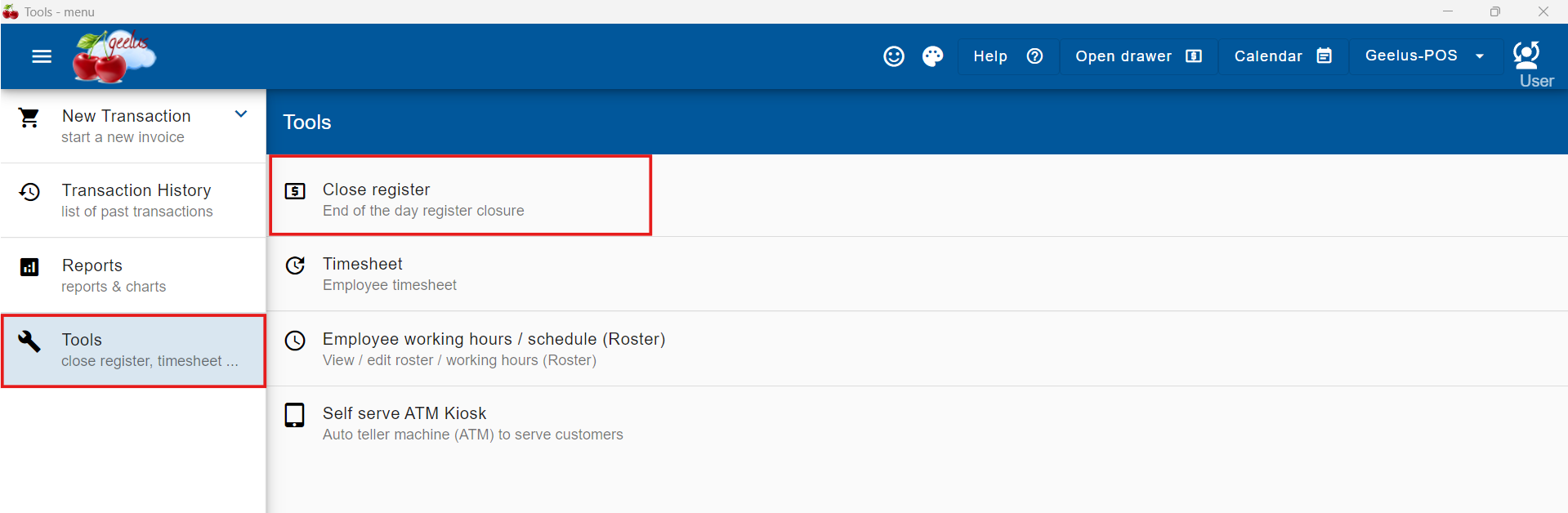
- Navigate to the Tools menu
- Select Close Register
- Review payment methods and balances
- Geelus displays all payment methods (Cash, Card, etc.) with their recorded totals for the day on the left column
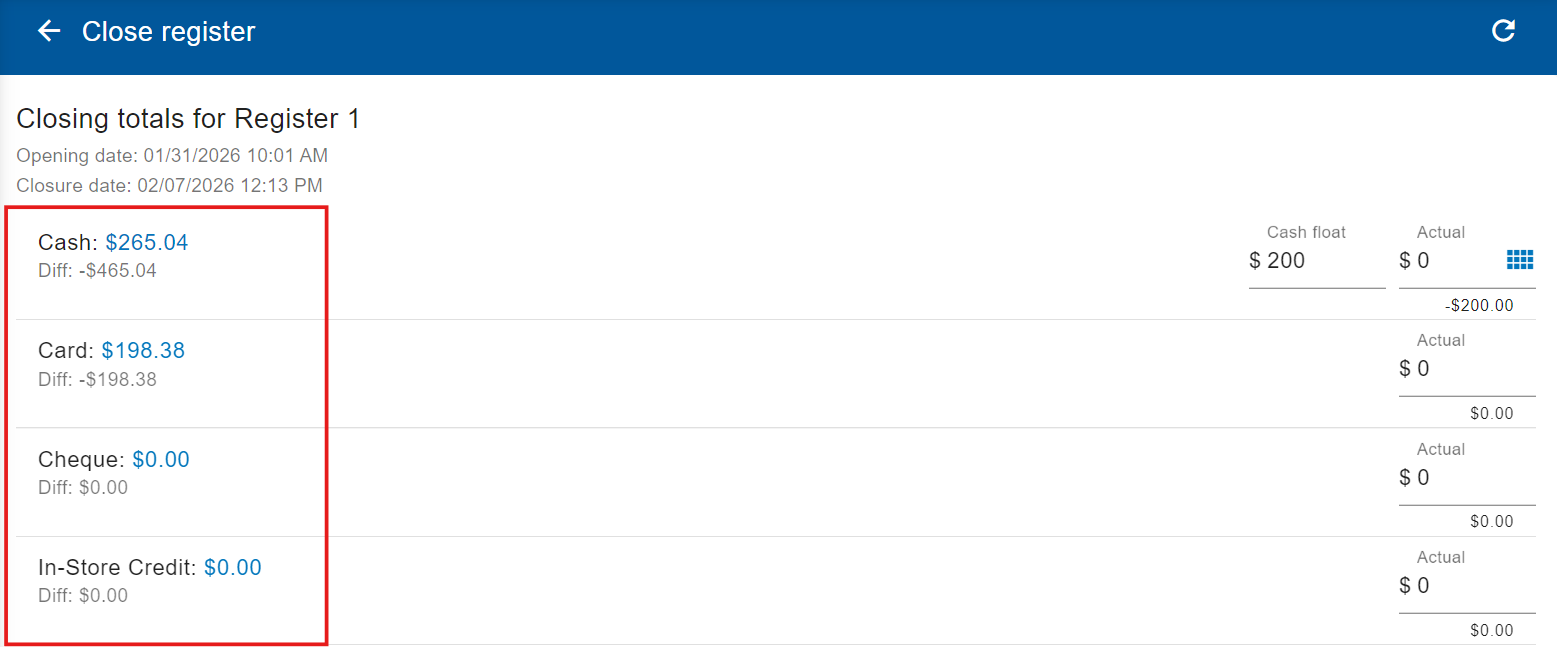
- Geelus displays all payment methods (Cash, Card, etc.) with their recorded totals for the day on the left column
- Verify actual payments against recorded payments
- Physically count the cash in the drawer, check card terminal totals, and any other payment methods.
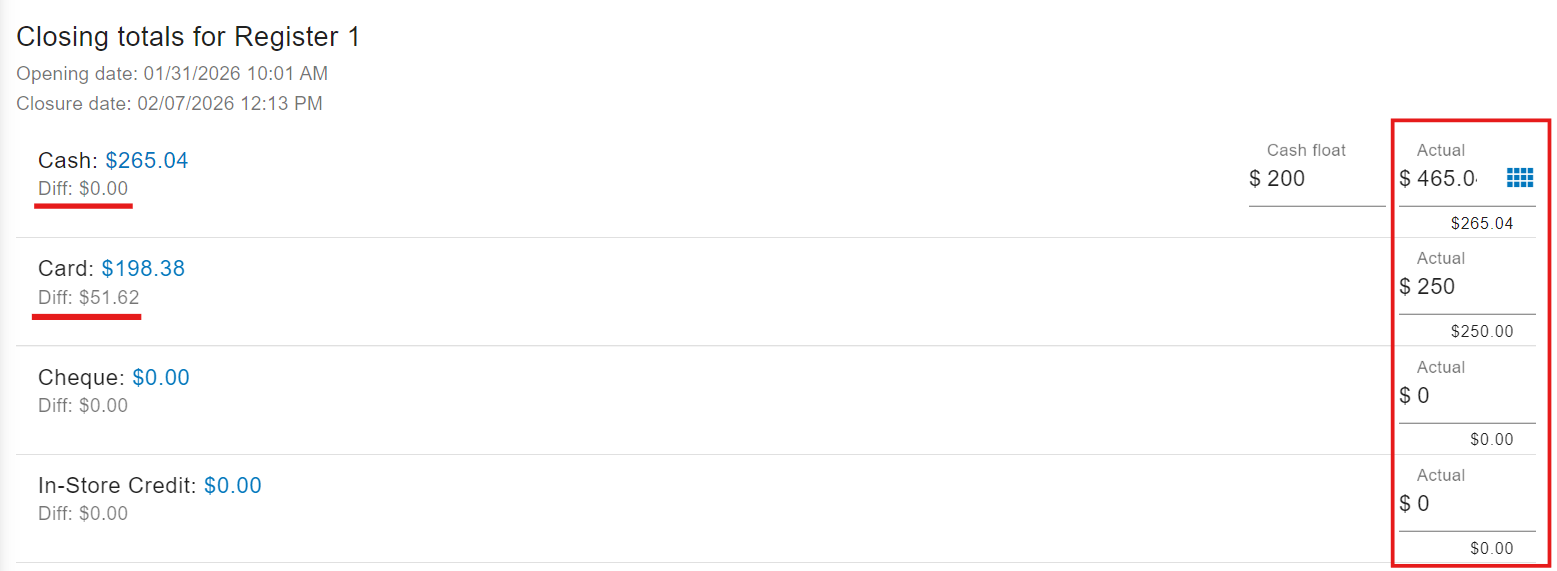
- Enter the counted amounts into the “Actual” field for each payment method.
- Geelus automatically compares the recorded and actual totals and will display any difference. total shown in Geelus.
- Check payment details (recommended)
- Click on any payment amount to view a breakdown, including:
- Payment date
- Customer name
- Transaction details
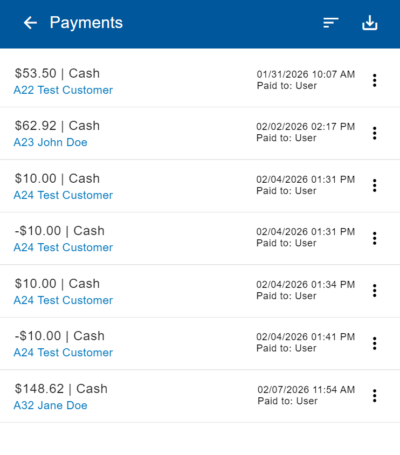
- Click on any payment amount to view a breakdown, including:
- Add notes:
- Document any discrepancies, large transactions, or relevant details (e.g., “$20 over due to unrecorded tip”).
- Complete the closure
- Click Close Register at the bottom. Geelus will save the record for reporting and will print the closure report.
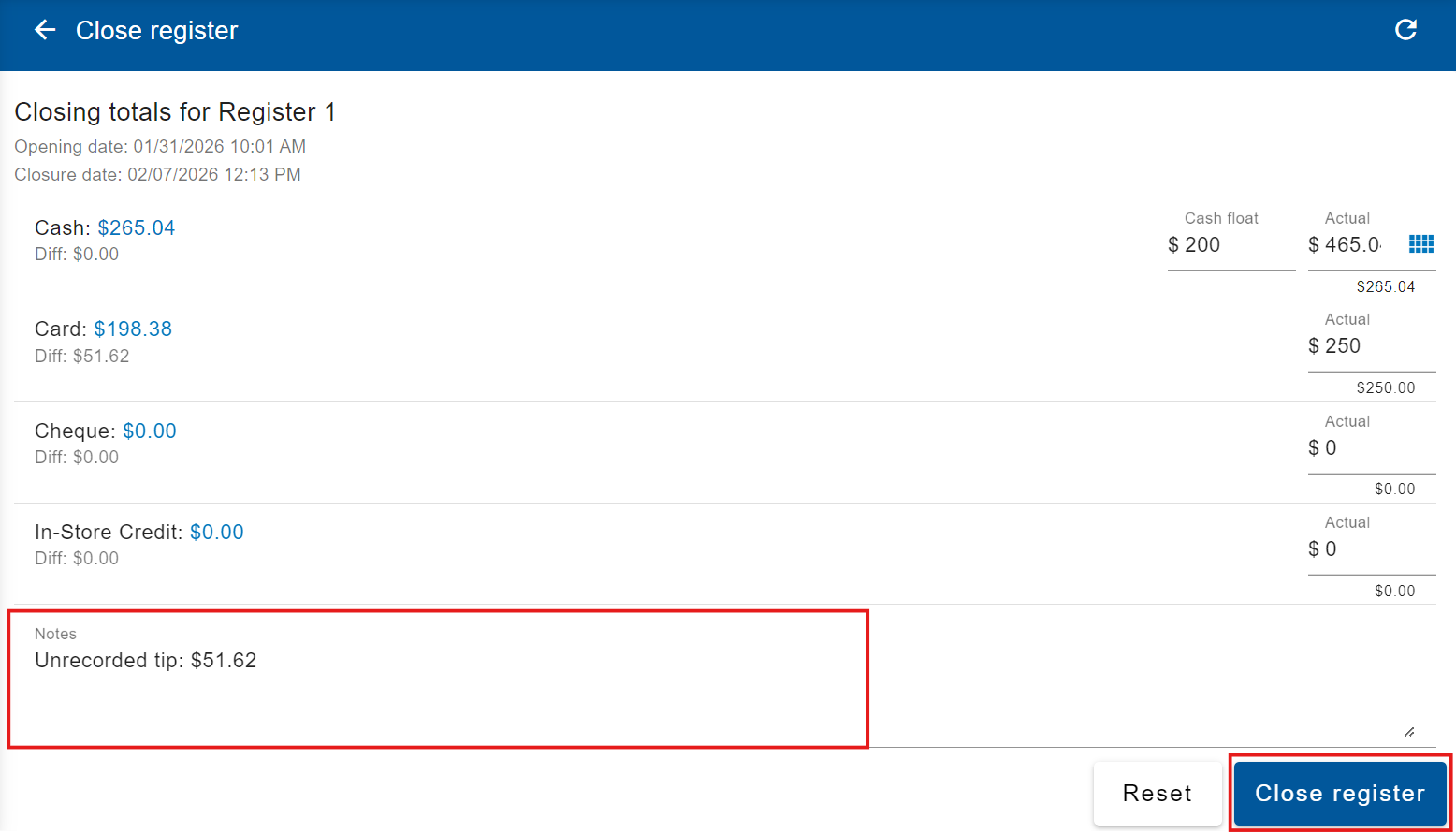
- Click Close Register at the bottom. Geelus will save the record for reporting and will print the closure report.
Need Advanced Cash Features?
If you’d like cash breakup functionality (entering denominations for precise counting), contact Geelus support—we can enable it for you.
Final Tips for Success
- Make register closure (and proper float handling) a non-negotiable daily habit.
- Train all staff on float discipline to minimize errors.
- Review closure reports regularly to spot patterns.
Accurate cash management builds trust in your numbers and protects your business. Have questions about closing the register, float setup, or any Geelus feature? Our support team is ready to help!